My Single Point of Failure Server
An adventure of running self-hosted services
My Single Point of Failure Server
- Backstory
- Virtualized Architecture
- Software Stack
- Issues
- Enter the new Era
Backstory
Long ago when starting my homelab, I gave myself an abnormal requirement: Try to use virtualization to do everything.
On one hand, virtualization is one of the coolest things I’ve ever come across. You can use one machine to operate hundreds of virtual machines and/or containers like it’s nothing. This doesn’t even stop there, you can handle networking and backups easily as well with a single platform.
But as always, this journey made me realize all the limitations and tensions im putting on a small amount of hardware.
This is it, my humble(ish) server. Now on paper is not that fast, especially when taking into account the hardware you could get in the consumer realm. But lets go over specs:
| TYPE | SPECIFICATION |
|---|---|
| CPU | Xeon E-2136 6c/12t @ 3.3Ghz |
| RAM | 64GB ECC unbuffered DDR4 (upgraded from 16GB) |
| Boot Drive | 512GB WD Blue NVME SSD |
| Storage | 3x22TB WD Gold drives (This is a recent purchase) |
I first got this server at Microcenter for $1400. I did it on a whim. Why? Well first off, I knew how it would eat at my soul with buying something that expensive and not doing anything. But second, this fit my needs.
Requirements
- Being able to fit on a shelf easily
- Although convenient, this generally means a small power supply with a small power supply fan, which generates an annoying amount of noise.
- Having IPMI or something like that.
- Not having to squat right next to my server when needed is a huge plus.
- This was also at a time in which the KVM options weren’t great with only a few contenders existed so a dedicated onboard IPMI made things convenient.
- Low power consumption
- Rack mounted servers recommended at the time had some crazy idle power consumption.
- Multiple hard drive bays
- Given the requirement above, this mean’t the options generally didn’t have a lot of hard drive bays.
- I thought of using a mini-pc at the time as they had most of the requirements above minus IPMI, but they were cheap. But they generally don’t have sata hard drive bays.
Virtualized Architecture
Operating System Proxmox has long been a main staple in my homelabbing adventure. I started out with it, moved to ESXI, Broadcom happened (see here) which made my switch to TrueNAS as I heard good things, finally moving back to Proxmox again due to limitations with TrueNAS for my needs.

(I thought buying the RAM upgrade from 16GB to 64GB was expensive then…)
Storage My first foray was short lived with creating a ZFS pool and allocating some of that to a VM with TrueNAS. Do not do this. This is a horrible, inefficient method of creating networked storage. I have 3 drives in ZFS RAIDz1 which should yield ~66.66% of the total or 2 of the three drives worth of storage. But with how ZFS handled this, you end up with something like 50% usable (see here).
I then learned about another way thanks to Apalrd on Youtube. In which you can use LXC containers which have the ability to use ZFS “Subvolumes” which is really just a directory within the ZFS pool that has a quota and is mounted to the LXC. This eliminates the ZFS overhead issues of the VM with the need to create a zvol thus going back to the expected ~66% usable storage compared to the ~50% usable storage.
So a Debian LXC with Cockpit was installed to make things smooth and a couple of Cockpit modules were added from 45 Drives. In all honesty, this worked great with little to no overhead as the LXC used ~100MB of memory and idled rather low. This enabled SMB and NFS, an in browser file explorer, as well as user and group management for the the SMB/NFS shares I was going to deploy. This however lacked an external backup feature. There was a module for scheduled jobs and you could download any backup tool you wanted, but this didn’t fit my mantra of simplicity.
Thus came the new era of TrueNAS. But as I first mentioned, this was an issue due to overhead, so how did I fix it? Well many of you would be thinking PCI passthrough of an HBA. If that was your guess, then you are partially correct. I only have a single PCI slot and want it to be used for a GPU or more storage. So I ruled that solution out long ago. That is until I ran lspci and noticed something that should have been obvious.

As you can see, the sata controller, the one that I’ve been using for my ZFS pool exclusively, was indeed just a PCI device. Yea no duh, I just didn’t think about it. Now I have to preface that you also need to double check that you don’t have any other devices in the same IOMMU group. For me, I didn’t so I was in the clear.
With that said, my new NAS was back to being TrueNAS virtualized in Proxmox. So for simplicity sake, I have TrueNAS doing the following:
- Handling ZFS and performing ZFS Scrubs
- Handling SMB / NFS shares
- Handling User and Groups for aforementioned shares.
- Handling encrypted backups to Backblaze.
- This is handled quite well with a pretty decent folder view in where you can checkbox certain folders to reduce unnecessary files. You can also easily add more folders as you see fit.

(I got soooo lucky at getting the 22TB WD Gold drives when I did, somehow at ~$300 each from CDW)
Lastly, I still have a 512GB WD Blue SSD running all the virtual machines and Linux Containers (LXCs).
Compute
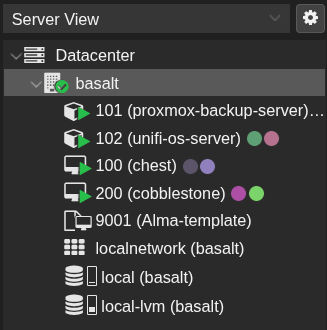
I used to have a cacophony of VMs that ran Docker and were all controlled by Portainer. Now I have a single VM hosting Docker with Portainer and all the basic services I used such as Immich. Besides that I have two LXC containers running Proxmox Backup Server (PBS) and Unifi-OS (The controller for my Ubiquiti Unifi equipment). This new compute stack is a really slimmed down version which makes way for the new compute stack.
To handle most of the provisioning, I use an Alma 10 Cloud Init template that I set up that automatically updates and provisions a user with my SSH key. Why Alma 10? Simply put, I wanted to try and be more “Enterprise-y” and CentOS was discontinued.
Enter the new Era
Masochism.
Er I mean Kubernetes.
I love containers, especially the efficiency and Iac and Kubernetes is kind of the first mainstream example and is usually the last that people try in their homelab. You see, who needs high availability in your own home with an average user count of something you can represent with a single hand of fingers? Moreover, do you really need scaling? Or how about Blue/green deployments? I mean my recipe tracker must have five nines of uptime, no negotiation.
All jokes aside, the points still stand and I still don’t recommend it unless you want to learn Kubernetes. I know a bit already but theres always room for growth. However, I know I don’t look forward to needing to manually handle certain things like manually creating containers or manually managing DB migrations.
So with that said, I plan to post an update as some point in time related to Kubernetes